Hands-On: StarryHub Core30 Dual-Camera Conference Hub
Introduction
Hybrid meetings have matured from a pandemic workaround into a permanent layer of enterprise communication. For organizations that equip mid‑size rooms for 8–10 people, the typical setup is a rat’s nest of peripherals: a PTZ camera, a speakerphone, an HDMI capture dongle, and a dedicated mini‑PC that someone inevitably unplugs. CZUR’s StarryHub Core30 enters this space with a bold consolidation play. It packs a Dual 4k conference hub into a single standalone terminal; no host laptop required. IBTimes spent three weeks testing the CZUR Core30 in a standard conference room to assess whether it can genuinely replace a multi‑vendor stack and earn its place on the meeting room table.
Design & Setup
The Core30 looks like a sleek, fabric‑wrapped smart speaker, a design choice that helps it disappear into a room’s decor rather than screaming “video conferencing appliance.” When dormant, the dual camera module retracts fully inside the chassis, a mechanical privacy shutter at 0° that provides visible, physical proof the lens is covered. This detail alone has made the device popular in finance and legal sectors where client confidentiality is non‑negotiable.
Around the back, the connectivity suite is generous: two HDMI outputs (one 4K at 120Hz, one 1080p at 60Hz), an HDMI input for content pass‑through, two USB 3.0 ports, a USB‑C port, an RJ‑45 LAN jack, a 3.5mm AUX line‑out, and the DC power inlet. The unit ships with a simple remote control, while an optional TouchBoard accessory adds a dedicated touch‑control pad for meeting room tables.
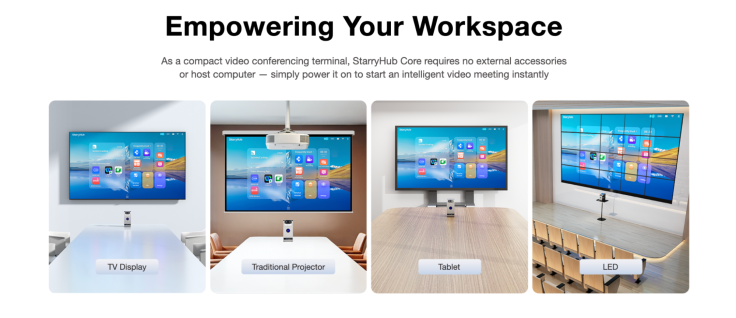
Setup takes under five minutes, and that is not marketing hyperbole. We connected power, ran an HDMI cable to a 55‑inch room display, and followed on‑screen prompts to join a Wi‑Fi 6 network and authenticate a Google account. Within that short window, native apps for Zoom, Microsoft Teams, and Google Meet were signed in and ready to launch. There was no driver installation, no USB tethering to a laptop, and no call to IT. The StarryOS 6.0 interface, built on Android 14, feels snappy thanks to an octa‑core processor and a dedicated 6‑TOPS neural processing unit that handles all AI tasks on‑device.
Camera & Audio Performance
The Core30’s headline feature is its dual‑camera system. A 123‑degree ultra‑wide lens captures everyone at the conference table in a single frame, while a 62‑degree telephoto lens with a 5‑meter range grabs close‑ups of active speakers. Both sensors capture video at 4K UHD resolution, delivering sharp detail and accurate color. In practice, the difference is immediate: instead of a single wide‑angle shot where faces become unidentifiable blobs beyond six feet, the Core30 cuts to a crisp, properly exposed portrait of the person speaking at the far end.
AI‑powered speaker tracking switches between the two lenses seamlessly. We observed a sub‑second response time when a new speaker chimed in from across the table, with a smooth transition from room view to individual frame. Hand‑raise detection triggered an on‑screen icon, alerting the remote moderator, an invaluable feature for structured meetings where not everyone can unmute freely. Gesture‑activated whiteboard tracking locked onto the presenter’s hand as she drew a diagram on the room’s physical whiteboard, cropping the video to the relevant area for remote attendees.
Audio capture relies on a six‑MEMS circular microphone array with a rated pickup of 8–12 meters. Our 10‑person conference room has standard acoustic treatment (carpet, drop ceiling, fabric panels) and the array delivered clear, balanced voice reproduction from every seat, including the corners. CZUR’s PureVoice 3.0 noise cancellation suppressed keyboard clatter, HVAC hum, and the rustle of papers without the underwater artifacts that aggressive noise gates produce.
During our testing, remote participants consistently reported clear voice reproduction and minimal background noise. They noted that even quiet comments from the far end of the table came through intelligibly, though we did notice a slight drop in clarity when a speaker was beyond the 10‑meter mark and facing away from the device. Dual 6‑watt speakers filled the room with enough volume for video playback and remote speech without distortion, and dual EQ modes let users switch between a voice‑optimized profile and a music‑oriented one for video embeds.
Features & Compatibility
The Core30’s Android foundation is its strategic differentiator. Instead of booting a PC and launching a conferencing app, users walk into the room and see their scheduled meetings on the home screen, pulled from Google Calendar or Microsoft Outlook. A single tap joins the call. The interface is purpose‑built for meetings: Meeting Mode drops you directly into the conferencing app of choice, while Whiteboard Mode opens a digital canvas for brainstorming, controllable via gestures without ever touching a screen.
Wireless casting supports up to nine simultaneous devices through Miracast, AirPlay, Chromecast, DLNA, and CZUR’s proprietary ClickDrop dongle. A presenter can walk in, share a laptop screen within 10 seconds, and see multiple attendees’ screens side‑by‑side on the room display. This capability—simultaneous multi‑screen comparison, proved surprisingly useful during document review sessions, where we compared a draft contract, a redline, and a spreadsheet at the same time.
BYOM (Bring Your Own Meeting) mode transforms the Core30 into a USB peripheral, exposing its camera, mic array, and speakers to a connected laptop. This mode preserves the flexibility to run any conferencing platform not natively supported on Android, such as Webex or GoToMeeting, while still leveraging the Core30’s superior optics and audio. Switching from standalone to BYOM takes under 10 seconds. Local recording captures meetings directly to 64GB of internal eMMC storage or an external USB drive, complete with real‑time captions and bilingual translation for global teams.
Compatibility is broad and enterprise‑tested. Native apps for Zoom, Teams, and Google Meet run smoothly, and the device performed without a dropped frame or audio glitch during a three‑hour hybrid workshop. The octa‑core processor (8nm, up to 2.2GHz) and 6GB of LPDDR5 RAM handled screen sharing, recording, and AI tracking concurrently without thermal throttling or fan noise, the Core30 is entirely fanless.
Limitations
No device is without trade-offs, and the Core30 is no exception. The most notable constraint is its lack of an internal battery. The unit requires constant AC power, which anchors it to a fixed power outlet and makes it unsuitable for ad‑hoc huddle spaces that demand grab‑and‑go portability. We found ourselves wishing for even a small backup battery to carry the device from one room to another without a full shutdown.
The Android‑based OS, while fast and focused, carries a smaller app ecosystem compared to Windows‑based meeting room solutions. Organizations that rely on niche conferencing platforms, specialized webinar tools, or custom enterprise software will find that the Google Play Store on StarryOS does not cover every edge case. BYOM mode mitigates this somewhat, but it reintroduces the very laptop dependency the Core30 aims to eliminate.
The 64GB of internal storage is adequate for recording occasional meetings but fills quickly for teams that record every session. Heavy users will need to budget for external USB storage or regularly offload recordings. The accessory ecosystem—TouchBoard, WritePad, ClickDrop—adds meaningful functionality but comes at additional cost, meaning the base unit price is not the total cost of a fully equipped room.
We also noticed that the speaker volume, while sufficient for a 10‑person room, struggled to fill the space when ambient noise from an adjacent hallway crept in. The AI auto‑framing occasionally hunted when two people spoke simultaneously, though it corrected itself within a couple of seconds. The device’s fabric exterior, while attractive, attracts dust more readily than a metal or hard‑plastic chassis, a minor but practical consideration for long‑term maintenance in busy offices.
Closing Opinion
The StarryHub Core30 delivers what over‑engineered meeting rooms have long lacked: a single, competent appliance that replaces a camera, a speakerphone, a casting dongle, and a dedicated PC. Its dual‑camera system is genuinely superior to single‑lens video bars in mid‑size rooms, and the privacy‑shutter design addresses a growing enterprise security requirement that software toggles cannot satisfy. The Android OS eliminates the friction of host‑laptop dependency, though organizations tied to non‑standard conferencing platforms will need to budget for the accessory ecosystem and plan around the smaller Android app catalog.
For businesses standardizing on Zoom, Teams, or Google Meet across 8–10 person spaces, the CZUR Core30 is not just a viable alternative to traditional meeting bars but often the simpler, more privacy‑conscious, and more capable choice. If you are looking to replace scattered conference equipment with one integrated Dual 4k conference hub that respects both IT staff time and user privacy, this hardware option warrants a hard look.